Methodsmith Setup Guide
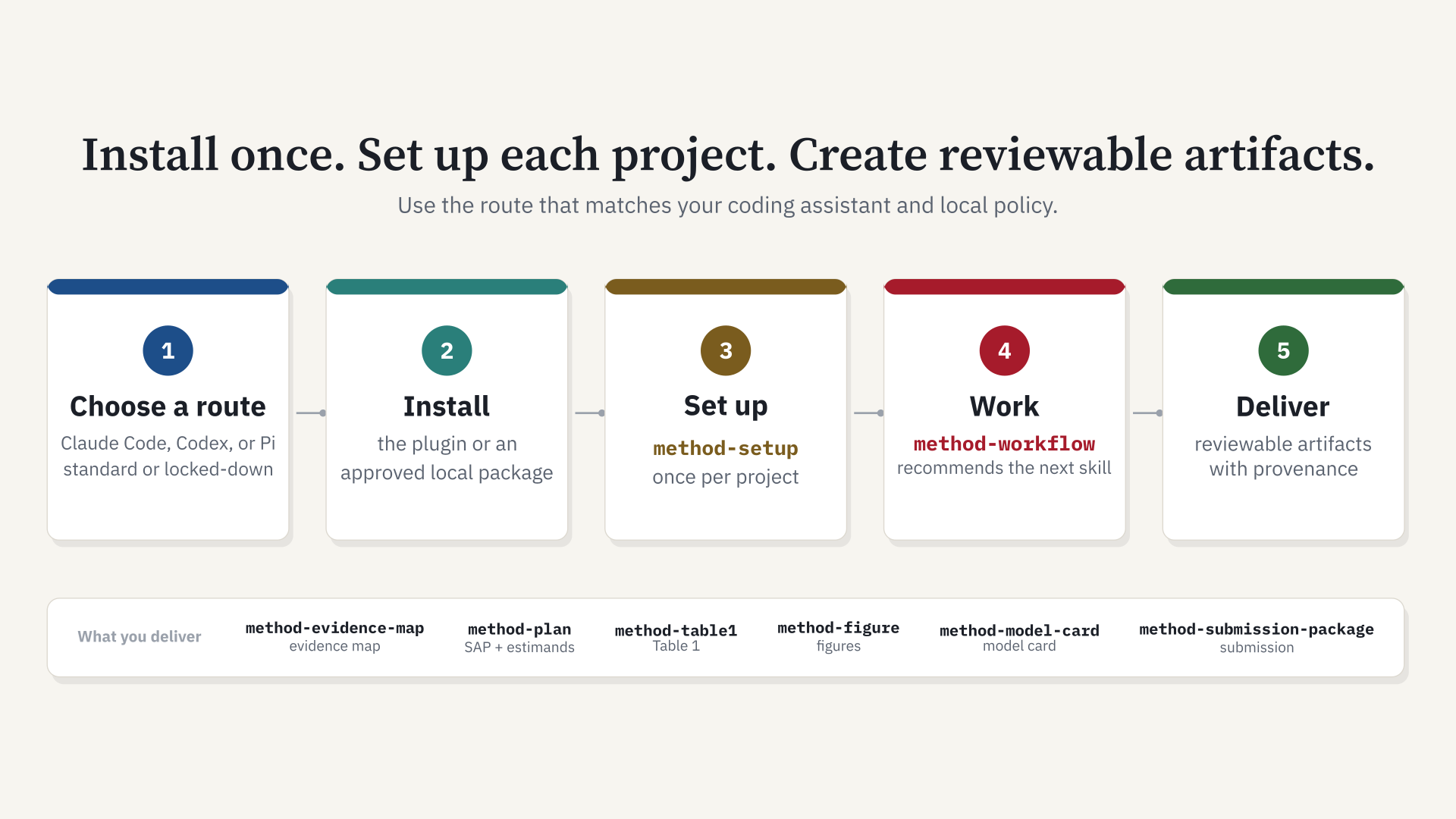
Methodsmith is a plugin for Claude Code and Codex. This guide is the fastest
path from a fresh machine to a working methodsmith install. Use Bash on macOS,
Linux, WSL, or Git Bash. Use PowerShell on native Windows. Upgrading from
ce-datascience (the plugin's name before 5.0)? See
Moving from ce-datascience.
Methodsmith builds on Every's Compound Engineering plugin.
Research use
Research use only; not a medical device for clinical care. Methodsmith supports research workflows and is not intended to diagnose, treat, cure, mitigate, or prevent disease or to guide patient-specific care. It is not validated for clinical use and does not replace qualified clinical, statistical, ethics, or institutional review.
Visual Overview
OS Support Matrix
| OS | Recommended shell | Easiest command | Notes |
|---|---|---|---|
| macOS | Bash or Zsh | bash install.sh claude --aliases or bash install.sh codex | Fully supported and tested locally on macOS. |
| Linux | Bash | bash install.sh claude --aliases or bash install.sh codex | Covered by Bash syntax tests and temp-root install tests. |
| Windows with WSL | Bash inside WSL | bash install.sh claude --aliases or bash install.sh codex | Use Linux paths inside WSL, such as /mnt/c/... only when needed. |
| Windows with Git Bash | Git Bash | bash install.sh claude --aliases or bash install.sh codex | C:/Users/... paths are accepted by the Bash helper. |
| Windows PowerShell | PowerShell | .\install.ps1 claude -Aliases or .\install.ps1 codex | Native Windows path handling and Codex offline install support. |
Choose Your Install Route
If you have a source checkout, run the read-only install check first:
bash install.sh doctor
On Windows PowerShell, use:
.\install.ps1 doctor
The check reports whether the checkout or approved artifact is recognized and whether the local Claude, Codex, and optional Bun tools are available. Use the standard route below on a personal or managed laptop that can run Git and the agent CLI. On a locked-down or corporate laptop, skip source-build tooling and use the approved offline artifact route in section 2.
1. Easiest Install Path
This mirrors the original Compound Engineering plugin experience: install once, then run setup.
Claude Code
No checkout needed (terminal command, Claude Code 2.1.292 or later): install straight from the GitHub marketplace, then start Claude Code.
claude plugin install methodsmith --marketplace sajor2000/methodsmith
claude
The same one-step install works inside a running Claude Code session (2.1.275 or later):
/plugin install methodsmith --marketplace sajor2000/methodsmith
These version requirements differ between the terminal and in-session commands; see the Claude Code publishing guide.
From a source checkout (also adds the optional bare /method-* aliases), on macOS,
Linux, WSL, or Git Bash:
git clone https://github.com/sajor2000/methodsmith.git ~/methodsmith
cd ~/methodsmith
bash install.sh claude --aliases
claude
Windows PowerShell:
git clone https://github.com/sajor2000/methodsmith.git "$HOME\methodsmith"
cd "$HOME\methodsmith"
.\install.ps1 claude -Aliases
claude
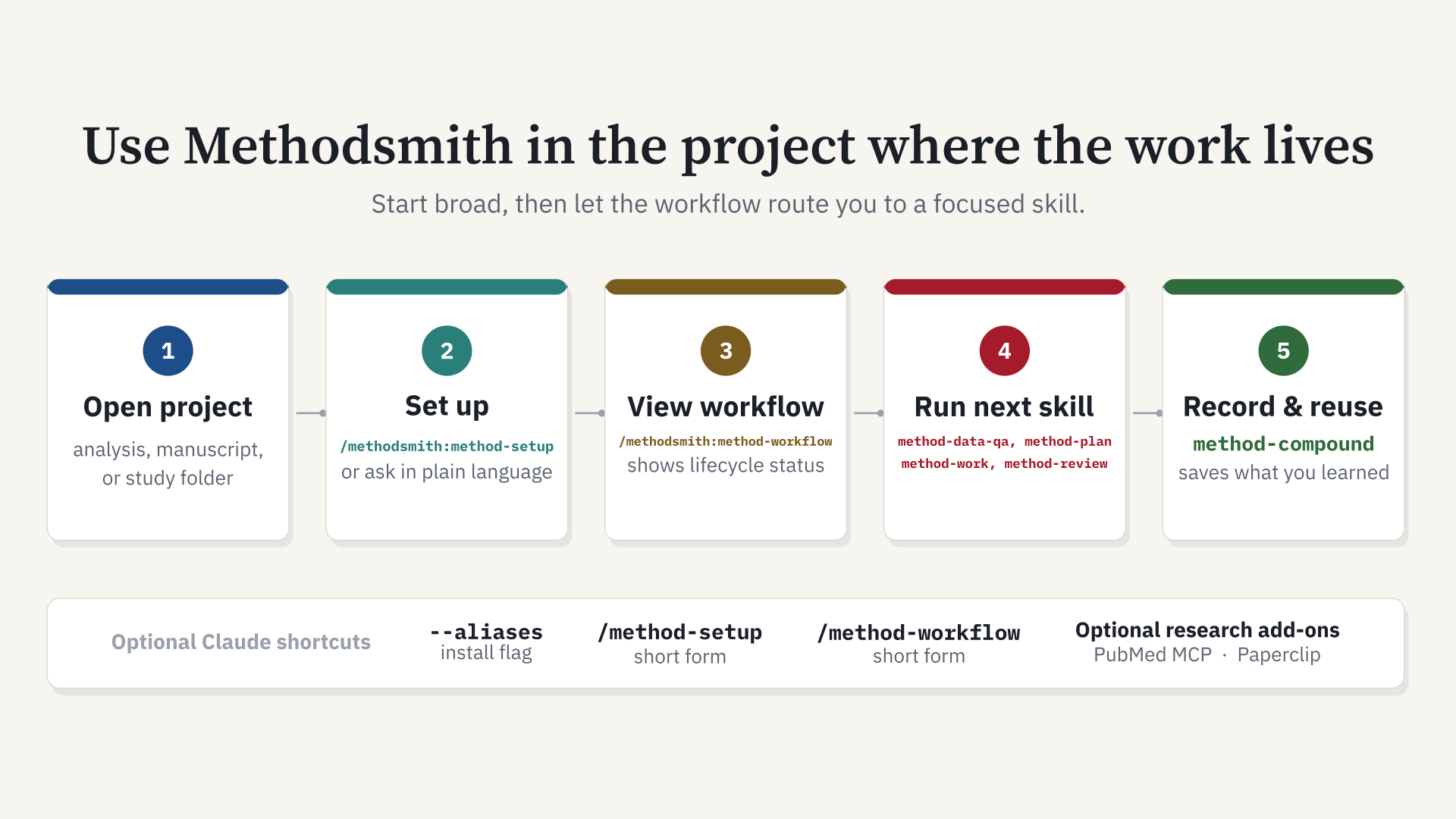
Then open the target project and run:
/methodsmith:method-setup
The helper adds the GitHub marketplace, installs the plugin, and turns on
auto-update (see Keep Methodsmith updated).
Pass --source . to use the checkout as a local marketplace instead. The
namespaced command is the reliable default. --aliases is optional and adds
safe local bare /method-* demo commands.
Codex
macOS, Linux, WSL, or Git Bash:
git clone https://github.com/sajor2000/methodsmith.git ~/methodsmith
cd ~/methodsmith
bash install.sh codex
codex
Windows PowerShell:
git clone https://github.com/sajor2000/methodsmith.git "$HOME\methodsmith"
cd "$HOME\methodsmith"
.\install.ps1 codex
codex
Inside Codex, run /plugins, install Methodsmith, restart Codex, then
start a new thread and ask Codex to use Methodsmith for setup. If Bun is
available, the helper also installs the generated Methodsmith agents into the selected
CODEX_HOME.
Pi
Pi uses the generated installation path rather than a native marketplace.
pi install npm:pi-subagents
pi install npm:pi-ask-user
cd ~/methodsmith
bun run src/index.ts install ./plugins/methodsmith --to pi --pi-home "$HOME/.pi/agent"
Restart Pi, open the project, and invoke method-setup using Pi's normal skill
interface. pi-subagents is required for Methodsmith subagent workflows; pi-ask-user
is recommended for the compact setup confirmation.
What the easy installer does
| Target | Installer action | Required finish |
|---|---|---|
| Claude Code | Adds the GitHub marketplace (or this checkout with --source), installs methodsmith, turns on auto-update, and optionally creates managed bare /method-* aliases | Restart Claude Code, open the project or study directory, then run /methodsmith:method-setup or the optional /method-setup alias |
| Codex | Adds the GitHub marketplace (or this checkout with --source) so codex plugin marketplace upgrade works and, when Bun is available, writes the generated agent bridge into the selected CODEX_HOME | Restart Codex, open /plugins, install Methodsmith, restart again, then start a new task in the target project |
| Pi | Writes generated Methodsmith skills and agents under the selected Pi home, plus a managed block in that root's AGENTS.md | Install pi-subagents, restart Pi, open the target project, then invoke method-setup |
The installer does not configure every research project globally. The
method-setup skill creates project-local configuration after the plugin is loaded.
Run setup again when a different project uses a different language, IDE, data
layer, or reporting workflow.
Keep Methodsmith updated
How a new version reaches you depends on the agent.
| Agent | Automatic? | Update by hand |
|---|---|---|
| Claude Code | Yes, once auto-update is on for the methodsmith marketplace. bash install.sh claude and .\install.ps1 claude turn it on (add --no-auto-update or -NoAutoUpdate to skip). After a one-line claude plugin install ... --marketplace sajor2000/methodsmith, turn it on yourself: run /plugin, open Marketplaces, select methodsmith, and choose Enable auto-update. | claude plugin update methodsmith@methodsmith, then /reload-plugins |
| Codex | No. Codex has no documented automatic plugin update. | codex plugin marketplace upgrade methodsmith, then restart Codex. Refresh the generated agents with bunx github:sajor2000/methodsmith install methodsmith --to codex |
| OpenCode, Pi, Gemini CLI, Kiro | No. These use generated files. | bunx github:sajor2000/methodsmith install methodsmith --to opencode (or --to pi, --to gemini, --to kiro; add --output <workspace> for a project install) |
| Qwen Code | No. | qwen extensions update methodsmith |
| Local checkout or offline package | No. | git pull in the checkout (or unpack the new package), then re-run the installer |
With auto-update on, Claude Code checks in the background a few minutes after
your first message and shows Plugin updated ... Run /reload-plugins to apply.
Your current session keeps the version it started with. A marketplace added
from a local folder never auto-updates, because Claude Code loads that folder
in place; that is why the installers now add the GitHub marketplace unless you
pass --source. Setting DISABLE_AUTOUPDATER=1, DISABLE_UPDATES=1, or
CLAUDE_CODE_DISABLE_NONESSENTIAL_TRAFFIC=1 turns the background update off
unless you also set FORCE_AUTOUPDATE_PLUGINS=1.
Not sure which command applies? Run the method-update skill (/method-update in
Claude Code). It prints the exact command for the agent you are in.
Moving from ce-datascience
Methodsmith is the same plugin as ce-datascience, renamed in 5.0. Every
command and agent now starts with method- instead of ce-. A few names are
also shorter, for example /ce-statistical-analysis-plan is now /method-sap.
What stays the same: your own skills, your project's .ce-datascience/
folder (including the PHI-boundary settings in config.local.yaml), and the
plan -> work -> review -> compound loop.
What the switch does: the first Methodsmith install moves the old plugin's
files to a backups/ folder next to the new install. Nothing is deleted, and
files you created are not touched.
To see what is installed on your machine, run /method-update after
installing Methodsmith, or run the same read-only checker from a checkout. It
prints exactly the commands below for each harness it finds:
bash plugins/methodsmith/skills/method-update/scripts/detect-pre-rename-install.sh
| Harness | Switch to Methodsmith |
|---|---|
| Claude Code | claude plugin uninstall ce-datascience@ce-datascience-plugin, then claude plugin marketplace remove ce-datascience-plugin, claude plugin marketplace add sajor2000/methodsmith, claude plugin install methodsmith@methodsmith. If you used --aliases, re-run bash install.sh claude --aliases. |
| Codex | codex plugin marketplace remove ce-datascience-plugin, then codex plugin marketplace add sajor2000/methodsmith and bunx github:sajor2000/methodsmith install methodsmith --to codex. Open /plugins and install Methodsmith. |
| OpenCode | bunx github:sajor2000/methodsmith install methodsmith --to opencode |
| Pi | bunx github:sajor2000/methodsmith install methodsmith --to pi --pi-home ~/.pi/agent |
| Gemini CLI, Kiro | bunx github:sajor2000/methodsmith install methodsmith --to gemini --output . (or --to kiro) in each workspace |
| Qwen Code | qwen extensions uninstall ce-datascience, then qwen extensions install sajor2000/methodsmith:methodsmith |
On Claude Code with --aliases, the old /ce-* commands keep working for one
release as deprecated aliases that point at the new skills. Elsewhere, use the
new names.
Every renamed command
| Before 5.0 | Methodsmith |
|---|---|
/ce-adversarial-review | /method-adversarial-review |
/ce-bioinfo-qc | /method-omics-qc |
/ce-brainstorm | /method-brainstorm |
/ce-checklist-match | /method-checklist |
/ce-clean-gone-branches | /method-clean-branches |
/ce-clif | /method-clif |
/ce-clif-meta-analysis | /method-clif-meta-analysis |
/ce-clif-project-template | /method-clif-template |
/ce-clinical-research-voice | /method-voice |
/ce-code-review | /method-review |
/ce-cohort-build | /method-cohort |
/ce-commit | /method-commit |
/ce-commit-push-pr | /method-pr |
/ce-compound | /method-compound |
/ce-compound-refresh | /method-compound-refresh |
/ce-data-qa | /method-data-qa |
/ce-debug | /method-debug |
/ce-doc-review | /method-doc-review |
/ce-effect-size | /method-meta-analysis |
/ce-evidence-map | /method-evidence-map |
/ce-fabric | /method-fabric |
/ce-figure | /method-figure |
/ce-genome-build | /method-genome-build |
/ce-grill | /method-grill |
/ce-handoff | /method-handoff |
/ce-ideate | /method-ideate |
/ce-language-detect | /method-language-detect |
/ce-literature-search | /method-lit-search |
/ce-manuscript-citations | /method-citations |
/ce-manuscript-package | /method-submission-package |
/ce-manuscript-section-discipline | /method-section-check |
/ce-marimo | /method-marimo |
/ce-method-extract | /method-extract |
/ce-ml-experiment-track | /method-ml-track |
/ce-model-card | /method-model-card |
/ce-model-strategy | /method-model-choice |
/ce-notebook-edit | /method-notebook-edit |
/ce-notebook-standards | /method-notebook-standards |
/ce-numbers | /method-numbers |
/ce-optimize | /method-optimize |
/ce-phenotype-validate | /method-phenotype |
/ce-plan | /method-plan |
/ce-power | /method-power |
/ce-pre-submission-audit | /method-presubmit |
/ce-prereg | /method-prereg |
/ce-pubmed | /method-pubmed |
/ce-release-notes | /method-release-notes |
/ce-report-bug | /method-report-bug |
/ce-research-question | /method-question |
/ce-resolve-pr-feedback | /method-resolve-feedback |
/ce-review-pack | /method-signoff |
/ce-rstats | /method-r |
/ce-sap-tabular | /method-sap-workbook |
/ce-sas-stata-assess | /method-sas-stata |
/ce-scientific-anti-slop | /method-anti-slop |
/ce-scientific-writing | /method-write |
/ce-sessions | /method-sessions |
/ce-setup | /method-setup |
/ce-sprint | /method-sprint |
/ce-statistical-analysis-plan | /method-sap |
/ce-table1 | /method-table1 |
/ce-trial-design | /method-trial-design |
/ce-update | /method-update |
/ce-verify | /method-verify |
/ce-work | /method-work |
/ce-workflow | /method-workflow |
/ce-worktree | /method-worktree |
Agents keep the rest of their name: ce-methods-reviewer is now method-methods-reviewer.
Your own skills are safe
Updates never delete or overwrite skills, agents, prompts, or commands you created.
- Generated installs (Codex agents, OpenCode, Pi, Gemini CLI, Kiro) record
every file they write, with a content hash, in
<agent folder>/methodsmith/owned-files.json. An update deletes only unchanged files on that list. - Files from an install made before ownership tracking are not on the list.
The installer treats one as the plugin's only when its install record or its
exact description shows methodsmith wrote it, and then moves it to
<agent folder>/methodsmith/backups/orlegacy-backup/instead of deleting it. This includes Codex's retired~/.codex/methodsmith/skillsfolder. - If you edited a file the plugin installed, the update copies your version to
<agent folder>/methodsmith/backups/<time>/before replacing it. - A file the plugin did not write is left alone, even when it has the name of
an old methodsmith skill such as
setuporskill-creator. The installer prints one line saying it kept the file. - Claude Code keeps the plugin in its own plugin cache under
~/.claude/plugins/, replaces that copy on every update, and deletes old versions later, so never keep your own files there.
Keep your own skills here:
| Agent | For you, in every project | For one project |
|---|---|---|
| Claude Code | ~/.claude/skills/<name>/SKILL.md | .claude/skills/<name>/SKILL.md |
| Codex | ~/.agents/skills/<name>/SKILL.md | .agents/skills/<name>/SKILL.md |
| OpenCode | ~/.config/opencode/skills/<name>/SKILL.md | .opencode/skills/<name>/SKILL.md |
| Pi | ~/.pi/agent/skills/<name>/SKILL.md | .pi/skills/<name>/SKILL.md |
| Gemini CLI | ~/.gemini/skills/<name>/SKILL.md | .gemini/skills/<name>/SKILL.md |
| Kiro | Not covered here | .kiro/skills/<name>/SKILL.md |
| Qwen Code | ~/.qwen/skills/<name>/SKILL.md | .qwen/skills/<name>/SKILL.md |
Do not start your own skill names with method-. That prefix belongs to the
plugin; if a name is already taken by your own skill, the installer skips the
plugin's version and tells you.
What setup asks
Setup inspects manifests, lockfiles, notebooks, imports, IDE files, existing Methodsmith configuration, verified database handoffs, and data-file patterns first. It shows a single detected-profile card and offers Continue with detected profile, Adjust a field, or Full survey. The normal path leaves optional library, statistics, environment, reporting, data-root, blinding, and checklist choices unset until the active workflow needs them; unknown language is never silently treated as mixed R + Python.
Sensitive-data boundary
Before setup looks at any data, method-setup asks one question and saves the
answer as phi_environment.mode in the gitignored, machine-local
.ce-datascience/config.local.yaml:
| Answer | Saved as | What happens |
|---|---|---|
| Approved endpoint: full access (HIPAA-compliant with a BAA, or institution-approved) | mode: approved | No restrictions on the model for the rest of the session. The agent never raises the boundary again. You are responsible for that approval. |
| Not approved or unsure: schema-only (also used when no answer is saved, or the saved value cannot be read) | mode: schema-only | The agent sees column headings, types, row counts, and % missing, never data values such as names, MRNs, or claim numbers. It writes scripts that print only aggregates, with counts under 11 suppressed. It cannot inspect example rows, debug value-level parsing or join mismatches by example, read free text, or spot individual entry errors. |
| No sensitive data: public or synthetic | mode: no-sensitive-data | No restrictions, never raised again. |
Older configs keep working: compliant: true reads as approved,
compliant: false as schema-only, and sensitive_data: false as
no-sensitive-data. If the keys disagree, any schema-only signal wins.
What enforces it. In Claude Code, a plugin PreToolUse hook
(hooks/data-boundary-guard.py) runs only inside projects that have a
.ce-datascience/ directory, in the working tree or the main checkout of a
linked worktree. It is silent unless it blocks a call. In schema-only mode it
denies:
Read,NotebookRead, and content-modeGrepon data files. Data files are.csv,.tsv,.parquet,.xlsx,.sas7bdat,.dta,.rds,.sqlite,.jsonl, and similar, including compressed or backup copies (.csv.gz,.csv.bak), plus anything under the configureddata_rootand the safe runner's logs. A notebook with saved outputs also counts; clear its outputs first.- Any shell command (
Bash,Monitor,PowerShell) whose text names a data path, an extension glob, ordata_root, whatever the program, unless it only lists metadata (ls,wc,du,find,git status/log) or runs the schema helper. Inline code (python -c,Rscript -e, heredocs) that opens data or globs a data directory, writing a script and running it in the same command, copying a data file to a non-data name, and recursivegrep/rgwithout an--include/-g/-tlimited to code are denied too. - Running a script file (
python,Rscript,bash/sh,quarto render,jupyter nbconvert --execute) whose code names a data path ordata_root, or calls a reader (read_csv,read_parquet,read_excel,read_sas,read_stata,fread,readRDS,arrow::, DuckDB, SQLite) on a path held in a variable, unless the command runs through the safe runner. The hook reads the script itself, up to 1 MB. Scripts that do not touch data, or that only read aggregate tables that pass the check below, run as before.
Safe runner. scripts/method-safe-run -- <command> runs the command and writes
its full stdout and stderr to .ce-datascience/runs/<UTC-timestamp>-<pid>.log
(gitignored). It prints only the exit code, the duration, the files created or
modified under the project (path, size, and row count for tabular files), and
the last 30 lines of stderr with quoted literals, digit runs of 4 or more,
emails, phone numbers, SSNs, and identifier-index values masked. Traceback file
and line frames stay readable. It never prints stdout: open the log yourself.
The hook's deny message gives the runner's full path. It accepts only the
plugin's own runner (or a byte-identical copy) and still checks uploads inside
it.
Aggregate reads. Read, cat, head, and tail of .csv, .tsv, and
.md files under the aggregate directories are allowed in schema-only mode
when the table passes the aggregate check: no identifier-like column headings,
no cell in the identifier index or shaped like an identifier, no integer count
from 1 to 10 (the small-cell rule; 0 is fine), and at most 500 rows. Otherwise
the deny reason names the rule that failed, never the value. The directories
default to output, results, analysis/publication, and
analysis/sap-tables; set phi_environment.aggregate_dirs to change them.
data_root always wins: nothing under it is readable.
The schema helper scripts/schema-peek.py prints headings, types, counts, and
% missing, never a cell value. It prints col_1..col_n when a file has no
header row, and col_<k> [masked header] for a heading that is itself an
identifier (an identifier shape, or a value in the identifier index).
What external tools receive
PubMed, Paperclip, and every other MCP tool receive search terms, MeSH terms, PMIDs, DOIs, and paper titles. They never receive data values, identifiers, row text, or data files. This holds in every mode, including after you approve the endpoint: approving the model endpoint does not cover third-party services such as NCBI or Paperclip.
Claude Code WebSearch queries, WebFetch URLs and prompts, MCP tool
arguments, and detected shell uploads are checked for common identifier
patterns and values in the project identifier index. Research search terms,
MeSH terms, PMIDs, DOIs, and paper titles pass when they do not match an
identifier.
The same hook enforces this for every mcp__* call, for shell uploads, and for
shell calls to NCBI E-utilities (curl or wget to
eutils.ncbi.nlm.nih.gov, and the method-pubmed search script). It denies
arguments that contain an SSN, an email address, a US phone number, a
keyword-anchored record number (MRN, medical record, patient ID, member ID,
claim number), a keyword-anchored date of birth, or a value in the identifier
index. It also denies Paperclip upload, import, or share calls that name a
local data file, and curl, wget, scp, or rsync uploads of data files.
PMIDs, DOIs, PMCIDs, author surnames, and ordinary research queries pass
silently. The skills carry the same rule.
Identifier index. Whenever data_root is set, in every mode, method-setup
builds and method-data-qa refreshes the identifier index with
scripts/method-identifier-index. It reads identifier-like columns under
data_root (names; MRN, patient, member, subscriber, and record IDs; claim
numbers; SSN; date of birth; address; phone; email) and stores only salted
hashes in .ce-datascience/identifier-index.local.json: local, gitignored,
with a random per-project salt and no plaintext. It prints counts only. Each
full value is stored, plus first+last name pairs, plus single tokens that
contain a digit for ID columns only, so a lone surname or common word never
matches. The hook hashes every one- to three-word run of each argument, denies
on a match without echoing it, and is silent when no index exists. With a
200,000-entry index the lookup adds a few milliseconds.
Limits. The hook is defense in depth, not a sandbox. Enforcement is Claude
Code only: Codex and OpenCode installs carry the hook entry but it exits
immediately there, and Gemini, Kiro, Copilot, and Pi skip hooks, so those
harnesses rely on the skill instructions alone. The hook requires python3.
If it is missing, the launcher prints a warning and exits successfully, so the
guard is inactive and calls are not blocked. The script check is heuristic
static analysis: a script that builds a data path at run time, or reads data
through a function the hook does not recognize, can still print values, and
programs it cannot parse (deliberate obfuscation) are out of scope. Values
that are not in identifier columns, such as free-text notes, are not indexed,
and the identifier patterns catch common shapes, not every one. A patient who
shares a full name with an author you search for blocks that name. A config
problem resolves to schema-only. An unexpected internal error blocks only
calls that mention a data file or an upload; anything else is allowed with a
one-line warning, so a hook bug never blocks unrelated work.
Changing the answer. Re-run method-setup, or edit or delete the
phi_environment block in .ce-datascience/config.local.yaml.
2. Locked-Down Or Demo Laptop
Locked-down laptop or team demo
Use this path when Bun, Git, GitHub CLI, Homebrew, npm, or Quarto are blocked. Basic plugin use does not require those tools.
Ask IT or the release owner for one of these approved artifacts:
methodsmith.zipfor Claude Codemethodsmith-claude-aliases.zipfor optional bare/method-*aliasesmethodsmith-codex-local.zipfor Codex local marketplace installs
Claude Code can load either an approved folder or ZIP:
claude --plugin-dir /approved/path/methodsmith
claude --plugin-dir /approved/path/methodsmith.zip
Use namespaced Claude plugin commands:
/methodsmith:method-setup --locked-down
/methodsmith:method-workflow
Bare /method-setup is not guaranteed by Claude plugin loading. It works only when
optional local aliases are installed into ~/.claude/commands or a project's
.claude/commands.
To install optional aliases from an approved plugin folder:
bash scripts/install/install-claude-aliases.sh --plugin-dir /approved/path/methodsmith --scope user
For project-only aliases, run from the project root:
bash scripts/install/install-claude-aliases.sh --plugin-dir /approved/path/methodsmith --scope project
To remove only managed Methodsmith aliases:
bash scripts/install/install-claude-aliases.sh --scope user --uninstall
For Codex without Bun, unpack methodsmith-codex-local.zip and run:
export CODEX_HOME="${CODEX_HOME:-$HOME/.codex}"
bash install-codex-offline.sh --source /approved/path/methodsmith-codex-local --codex-home "$CODEX_HOME"
On Windows PowerShell:
.\install.ps1 codex -Source C:\approved\methodsmith-codex-local -CodexHome "$HOME\.codex"
Then restart Codex, run /plugins, install Methodsmith from the local
marketplace, and restart again. The installer also writes generated agent bridge
files into the selected CODEX_HOME, copies the native plugin under the
marketplace root at .codex/plugins/methodsmith, and rewrites MCP paths to
that installed local plugin copy. The marketplace entry uses
source.path: "./.codex/plugins/methodsmith" so Codex can resolve it from
the marketplace root.
3. Source Checkout For Contributors
Bun and Git are required only when building, validating, converting, or developing the plugin from source.
4. Install Source Prerequisites
Install Bun if it is not already available:
curl -fsSL https://bun.sh/install | bash
Restart the shell, then verify:
bun --version
5. Clone Once
Clone the repo and install dependencies:
export CE_DS_REPO="$HOME/methodsmith"
git clone https://github.com/sajor2000/methodsmith.git "$CE_DS_REPO"
cd "$CE_DS_REPO"
bun install
Optional sanity check:
bun run release:validate
Expected result: release metadata is in sync, with the current agent and skill counts.
6. Pick Your Agent
Claude Code
Load the plugin directly from the checkout:
claude --plugin-dir "$CE_DS_REPO/plugins/methodsmith"
Optional shell shortcut:
printf "\nalias claude-ds='claude --plugin-dir %s/plugins/methodsmith'\n" "$CE_DS_REPO" >> ~/.zshrc
source ~/.zshrc
Then run claude-ds from any project.
In Claude Code, use namespaced plugin commands such as
/methodsmith:method-setup. Install optional local aliases only if you need bare
demo commands such as /method-setup.
Codex, Recommended Mode
Use Codex native plugin install for skills, then add generated agents with the
Bun installer. Use the same CODEX_HOME for both commands.
export CE_DS_REPO="$HOME/methodsmith"
export CODEX_HOME="$HOME/.codex"

codex plugin marketplace add "$CE_DS_REPO"
cd "$CE_DS_REPO"
bun run src/index.ts install ./plugins/methodsmith --to codex --codex-home "$CODEX_HOME"
codex
Inside Codex, run /plugins, select the local marketplace, install
methodsmith, then restart Codex.
For a separate research profile:
export CODEX_HOME="$HOME/.codex/profiles/research"
codex plugin marketplace add "$CE_DS_REPO"
cd "$CE_DS_REPO"
bun run src/index.ts install ./plugins/methodsmith --to codex --codex-home "$CODEX_HOME"
CODEX_HOME="$CODEX_HOME" codex
Codex, Standalone Generated Mode
Use this when native Codex plugin install is unavailable:
cd "$CE_DS_REPO"
bun run src/index.ts install ./plugins/methodsmith --to codex --codex-home "$CODEX_HOME" --include-skills
Standalone mode writes generated skills and agents. Managed .codex/hooks.json
entries are written only for plugins that declare hooks (Methodsmith
currently declares none); when present they preserve manual hooks and hooks
from other plugins. Optional MCP integrations remain user-configured.
Both Codex modes also write a managed METHODSMITH CODEX TOOL MAP block to
$CODEX_HOME/AGENTS.md. The method-setup health check reports only the retired
COMPOUND CODEX TOOL MAP block from older installs; re-running the installer
for the same CODEX_HOME replaces it.
OpenCode
Install into the workspace where OpenCode should load the plugin:
cd "$CE_DS_REPO"
bun run src/index.ts install ./plugins/methodsmith --to opencode --output /path/to/workspace
This writes opencode.json plus .opencode/agents and .opencode/skills under
the workspace (.opencode/plugins appears only when the plugin declares hooks;
Methodsmith currently declares none). If the output directory itself is
named opencode or .opencode, the writer treats it as a global OpenCode
config root and writes a flat layout instead.
Gemini CLI
cd "$CE_DS_REPO"
bun run src/index.ts install ./plugins/methodsmith --to gemini --output /path/to/gemini-workspace
This writes .gemini/skills and .gemini/agents. .gemini/settings.json is
merged only when the plugin declares MCP servers; Methodsmith declares none.
Kiro
cd "$CE_DS_REPO"
bun run src/index.ts install ./plugins/methodsmith --to kiro --output /path/to/kiro-workspace
This writes .kiro/skills, .kiro/agents, and a .kiro/steering file. MCP
settings are written only when the plugin declares MCP servers; Methodsmith
declares none.
Pi
Install the external Pi subagent prerequisite, then generate Pi files:
pi install npm:pi-subagents
cd "$CE_DS_REPO"
bun run src/index.ts install ./plugins/methodsmith --to pi --pi-home "$HOME/.pi/agent"
pi-subagents is required for Methodsmith workflows that delegate work. Add
pi install npm:pi-ask-user when you want Pi's compact blocking-question UI;
without it, skills use their documented numbered-choice fallback.
Qwen Code
Qwen Code uses its native extension installer:
qwen extensions install sajor2000/methodsmith:methodsmith
Qwen is not a generated --to qwen target. --to all only writes generated
targets that are detected on the machine.
Cursor, Copilot, and Droid
These tools load plugins through their own marketplace or plugin install flows
and are not generated converter targets; --to cursor, --to copilot, and
--to droid exit with a message that says so. The repo ships a Cursor
marketplace manifest (.cursor-plugin/marketplace.json) for Cursor's native
plugin install.
7. First Run In A Project
Installation and project setup are separate. First restart the agent, then open the project or study directory where you want help.
For Claude Code, run the native namespaced skills:
/methodsmith:method-setup
/methodsmith:method-workflow
If optional aliases were installed, the bare forms /method-setup and
/method-workflow work too. The namespaced form is the reliable default for a
native Claude plugin install.
For Codex, start a new task in the project and ask:
Use the Methodsmith method-setup skill for this project.
Then use the Methodsmith method-workflow skill and recommend the next step.
For generated targets such as OpenCode, Gemini CLI, Kiro, and Pi, restart the
agent after generation, open the output workspace, and invoke the generated
method-setup and method-workflow skills using that agent's normal skill interface.
method-setup inspects the current project and records its stack profile.
method-workflow reads that profile and existing artifacts, shows the ordered
lifecycle for the project type, data layer, and language, and recommends the
next safe skill. Neither skill performs an analysis merely because the plugin
was installed; the user chooses the next workflow action.
The first pass is evidence-first: setup and workflow inspect existing config, lockfiles, notebooks, IDE files, SAP artifacts, and recent verified connection handoffs before asking. Follow-up questions should be limited to decisions that change generated config, routing, or scientific scope.
Current workflow safeguards
The September 2026 upstream refresh tightened shared engineering behavior without replacing Methodsmith's SAP, PHI, real-data, or reporting rules:
method-planbegins its summary with an implementation-independent objective so the intended outcome remains stable when the implementation changes.method-worksends parallel work only from a verified tracked snapshot. Tasks that depend on uncommitted files remain inline or serial so workers do not act on stale code.method-optimizeruns parallel Codex experiments in separate directories and compares them against a recorded baseline and named metric.method-debugredacts secrets from captured evidence and repeats the original correctness or performance measurement after a fix.method-commitandmethod-pruse a temporary Git index for named-file commits, preserving unrelated staged entries and later working-tree edits.method-reviewappliesCODING_STANDARDS.mdonly where its path scope matches, while repository instructions remain authoritative.method-setupreports obsolete Codex tool-map blocks and asks before cleanup.
Scientific input and disclosure contracts
Power-effect pooling requires a selected compatible estimand, outcome/horizon,
adjustment set, scale/unit and independent contributions. Its contract= artifact
travels with the pooled signal; legacy tables/signals need reconciliation before
automatic power use. Formal study/performance synthesis uses
method-clif-meta-analysis, not the power-anchor parser. Verification separates
inferential MI from prediction validation/deployment and event targets from
recruitment N. Equivalence alpha follows the study framework rather than a
universal NI convention. Phenotype validation rejects duplicate patient keys.
Tracking preserves the chosen validation design and keeps full sensitive logs
restricted; only reviewed, disclosure-safe aggregate summaries enter Git.
Numbers locked to raw data
Clinical journals, reviewers, and data-sharing audits ask where each number in a
paper came from. /method-numbers makes that answer checkable: a rigor signal, not a
style rule. Analysis code registers aggregates in
analysis/numbers/registry.json (R or Python; counts from 1 to 10 are stored
suppressed). The manuscript cites them as {{num:<id>}}. A gate fails the
submission when a number can't be traced. Each number follows one chain:
SAP output -> script@commit -> source file hash -> registry entry -> sentence.
Worked example (synthetic):
# analysis/primary_cox.R, committed before it runs
source("analysis/numbers/method_numbers.R")
register_number("primary.hr", 0.781, kind = "estimate", ci = c(0.664, 0.918),
                sources = "data/analytic.parquet", sap_output = "A3_cox_primary.csv")
manuscript/results.qmd:  The hazard ratio was {{num:primary.hr}}.
rendered:                The hazard ratio was 0.78 (95% CI, 0.66-0.92).
gate on a typed number:  manuscript/abstract.md:7: untraced number: 0.81
gate after a data pull:  registry:primary.hr: stale: source data/analytic.parquet changed
The gate also fails on unknown ids, unsuppressed small cells, entries without a
SAP output or committed script, and when it found nothing to check. It allows
years, citation markers, figure, table, and item numbers, dates, quoted
guideline text, and the doses or units you declare. Table 1, figure captions,
model cards, and scientific writing cite the registry; method-verify,
method-presubmit, and method-submission-package run the gate and fail
closed. Word manuscripts keep each number as a registry-owned field
(ADDIN CE_NUM <id>, beside Zotero's citation fields);
the gate fails a field whose text was hand-edited, and a number typed into a
Word table. Rendered text copies keep an adjacent .numbers.json provenance map; typed matching numbers and quoted results fail the gate. Word headers, footers and notes are checked alongside the body.
Numeric-prefix compounds such as 7-patient and 2.4-fold require registry provenance. Fixed design phrases such as 28-day need an explicit declaration; hyphenation is not an exemption. It does not read numbers inside images.
Versioned CLIF projects
For a CLIF repository, setup and workflow reuse a matching declared CLIF data dictionary and mCIDE family. When you need to choose explicitly, invoke one of these calls before category work:
/method-clif --version 2.1.0  # CLIF 2.1 + mCIDE 2.1
/method-clif --version 3.0.0  # CLIF 3.0 + mCIDE 3.0
/method-clif-meta-analysis  # Site-to-lead or literature synthesis in R/Python
An explicit call does not prompt again. If it conflicts with an explicitly declared local or project pair, Methodsmith shows the mismatch and asks which source is intended. It never infers CLIF 3.0 from a folder name or missing language signals.
Before patient-level access, Methodsmith applies the saved sensitive-data boundary (see
Sensitive-data boundary). Patient-level intermediates
remain under the declared approved restricted data root. The template
output/intermediate_phi/ path is used only when that exact location is
approved, local, non-synced, and gitignored; shareable reviewed aggregates stay
in output/final_no_phi/.
If another skill verifies a database connection first, it can emit a generic handoff such as:
__CE_CONNECTION__ name=healthmap-connection type=postgres database=healthmap_dev auth=entra status=verified
method-setup uses verified connection handoffs as defaults for database-backed
projects while keeping data_root optional for local extracts/cache files.
Good first workflows:
/method-question "sepsis bundles and 30-day mortality in ICU"
/method-data-qa
/method-model-choice
/method-plan
/method-work
/method-review
Those examples use the short names for readability. In Claude Code without
aliases, prefix each one with /methodsmith:, such as
/methodsmith:method-question. In Codex, ask it to use the named Methodsmith
skill. Skills operate on the currently open project and should be
given the scientific question, analysis goal, or code task they need.
Fabric and Marimo projects
For Microsoft Fabric, start with /method-fabric; it routes Lakehouse/Warehouse
coding, Data Factory pipelines, semantic models, ML, and Eventhouse/KQL work to
the matching workflow reference inside the same skill. The router keeps the standard data-QA and fail-loud
boundaries in place and does not create cloud resources or guess workspace
identities.
For reactive Python notebooks, use /method-marimo. It creates or reviews
text-native Marimo .py notebooks, preserves reactive cell dependencies, and
requires a marimo check validation pass when the project runner is
available.
For R-first projects, start with /method-r. It holds the R review,
tidyverse, event-study, package, CRAN, performance, and targets workflows as
reference files
while preserving the same estimand, data-QA, and reproducibility expectations
as Python projects.
Before planning or modeling, keep the integrity gate in place: method-data-qa
reconciles rows and joins, validates keys and types, and records missing-data
handling. It returns NO-GO for confirmed corruption or undeclared
synthetic/fallback data. Use method-model-choice after QA and before SAP
finalization when the model choice is nontrivial. For observational or causal work, planning requires an
estimand, analysis grain, keys, time zero, assumptions, and success criteria;
unresolved methodological choices remain analyst questions.
For dynamic survival models, method-review routes to the calibration reviewer
for decision-aligned, censoring-aware time-dependent AUC rather than treating a
generic AUC or C-index as sufficient. For claims-based studies, use
/method-plan for the canonical SAP, then add /method-sap when
the design needs linked claims, datasets, variables, diagnostics, outputs, and
decision evidence. /method-sap-workbook owns the workbook companion.
Statistical defaults follow current primary sources. SAPs state ICH E9(R1)
estimands, and method-sap-drift-detector flags estimand, missing-data, and
inference drift. /method-meta-analysis pools with REML, a Hartung-Knapp CI, and a
prediction interval. /method-checklist routes every prediction model to
TRIPOD+AI, target trial emulation to standalone TARGET, and protocols to SPIRIT
2025 or PRISMA-P. It always routes to the newest version of each guideline;
old names such as TRIPOD 2015 or QUADAS-2 resolve to the successor that
replaced them. Guideline sources lists each checklist's
primary citation, PMID, DOI, verification status, and superseded versions.
/method-pubmed keeps unindexed and non-English records unless
you pass --english-only. The root README's "Statistical correctness" section
lists the rest.
Each public skill starts with a Skill Value block that names the problem it
solves, when to use it, expected output, when it should ask questions, and what
it should not do. Use that block to choose the right slash command during a demo
or first project walkthrough.
For publication artifacts:
/method-table1
/method-figure
/method-submission-package
/method-signoff
Pass /method-table1 --design rct|observational|descriptive so Table 1 matches the
design: randomized trials get no baseline p-values, and observational
comparisons get a standardized mean difference (SMD) column.
For a manuscript handoff, assemble artifacts with /method-submission-package,
resolve editable Zotero fields with /method-citations, draft or revise
the prose with /method-write, run
/method-presubmit as the combined final editing gate, and finish with
/method-signoff. The focused voice, section-discipline, and anti-slop skills
remain available for targeted passes; section discipline preserves rationale
required by reporting guidelines, protocols, regulations, or reproducibility
standards.
For locked-down laptops, run setup in no-install mode:
/methodsmith:method-setup --locked-down
This reports missing tools but does not offer Homebrew, pip, npm, GitHub CLI, or Quarto install commands.
8. Optional Research Add-ons
Methodsmith works without external research services: /method-pubmed uses the
bundled NCBI E-utilities workflow, and /method-evidence-map falls back to that
PubMed baseline. For deeper scientific research and planning, consider one of
these optional add-ons:
| Add-on | Recommended when you need | Connection |
|---|---|---|
| PubMed MCP Server | Agent-native PubMed and Europe PMC search, MeSH lookup, related/citing articles, identifier conversion, citation formatting, and available open full text | Prefer local stdio with npx -y @cyanheads/pubmed-mcp-server@latest; a public hosted endpoint is also available from the project |
| Paperclip | Full-text corpus search, parallel evidence extraction, claim verification, figures, regulatory documents, trials, preprints, and biological databases | Install the CLI and Paperclip's official agent skill in your own terminal, or configure its hosted MCP endpoint |
Choose the PubMed MCP server as the lightweight default for biomedical search and research-question refinement. Add Paperclip when the project needs deeper full-text synthesis or sources beyond PubMed. They can be used together: PubMed remains the canonical metadata baseline, while Paperclip deepens selected claims and methods against full text.
For Word manuscript citations, use the method-citations skill after
installing or connecting PubMed MCP and, when permitted, Paperclip. It keeps
PubMed identifiers and Paperclip claim evidence in a citation ledger, then uses
Zotero-owned Word fields for the editable DOCX master. Static superscripts and
typed bibliography entries are not treated as editable citations.
Methodsmith's artifact-producing workflows currently auto-detect only the Paperclip CLI.
PubMed MCP and Paperclip's external skill or MCP server are direct agent
capabilities; Methodsmith does not automatically translate their results into the
__CE_PUBMED_RESULTS__ CSV handoff or __CE_EVIDENCE_MAP__ artifact. Continue
through /method-pubmed and /method-evidence-map when downstream Methodsmith skills need those
handoffs.
Example local PubMed MCP configuration:
{
  "mcpServers": {
    "pubmed-mcp-server": {
      "type": "stdio",
      "command": "npx",
      "args": ["-y", "@cyanheads/pubmed-mcp-server@latest"],
      "env": {
        "MCP_TRANSPORT_TYPE": "stdio",
        "MCP_LOG_LEVEL": "info",
        "NCBI_API_KEY": "your-optional-key"
      }
    }
  }
}
Remove NCBI_API_KEY when no key is available. Follow the add-on's client guide
for the correct MCP configuration file and restart the agent after changing it.
For Paperclip, follow its current installation guide, verify CLI access with
paperclip config, then install the official Paperclip skill from Paperclip:
paperclip install
paperclip install provides an interactive agent picker and fetches the skill
from Paperclip. Use paperclip install --dir /path/to/project for a specific
project. Agents should load the provider's current instructions with
paperclip skill before Paperclip work. Methodsmith links to this external
skill; it does not vendor, fork, or maintain it.
Privacy and network safety: both add-ons are third-party services. Review their
licenses, data handling, network destinations, and institutional policy before
use. Never send protected
health information, credentials, private manuscripts, or confidential research
queries to a hosted endpoint without approval. Prefer local stdio where policy
requires local process control. Methodsmith must not install or authenticate
either add-on automatically. Explicitly running /method-evidence-map authorizes
its documented optional deepening: when the Paperclip CLI is installed and
authenticated, that workflow may contact Paperclip. Use /method-pubmed alone when
Paperclip network access is not permitted.
9. Update An Existing Checkout
This section is for contributors working from a clone. For the per-agent update commands, see Keep Methodsmith updated.
cd "$CE_DS_REPO"
git pull
bun install
bun run release:validate
Then restart the agent. For generated targets, rerun the install command for that target so generated files and MCP paths refresh.
10. Build Offline Artifacts
Release owners with a working source checkout can build the corporate ZIPs:
bun run package:corporate
The build writes:
dist/corporate/methodsmith.zipdist/corporate/methodsmith-claude-aliases.zipdist/corporate/methodsmith-codex-local.zip
Troubleshooting
| Symptom | Fix |
|---|---|
bun: command not found | Re-run the Bun install command, restart the shell, and check bun --version. |
Claude says /method-setup is unknown | Use /methodsmith:method-setup, or install optional local aliases. Restart Claude Code after installing a plugin or aliases. |
Windows PowerShell cannot run bash install.sh | Use .\install.ps1 claude -Aliases or .\install.ps1 codex. Use Bash commands only in WSL or Git Bash. |
| Corporate laptop blocks Bun, GitHub CLI, Git, or Quarto | Use the approved Claude plugin folder/ZIP or Codex local marketplace package. Bun and Git are source-build tooling; GitHub CLI is only for GitHub helper skills; Quarto is only for Quarto render workflows. |
| Paperclip is missing or blocked | /method-evidence-map still works from PubMed-only evidence. Paperclip is optional for full-text, result-set grep/map, SQL, and figure deepening. |
Local install says it cannot find plugins/methodsmith remotely | Use ./plugins/methodsmith from the repo root, including the leading ./. |
| Codex installed into the wrong profile | Set CODEX_HOME and pass the same value to --codex-home. |
| Codex has duplicate or stale Methodsmith files | Rerun the Codex installer for the same CODEX_HOME; managed artifacts are namespaced and stale managed files are cleaned. |
method-setup reports a legacy Compound Codex tool map | Rerun install --to codex --codex-home "$CODEX_HOME"; it replaces the retired COMPOUND CODEX TOOL MAP block with the current Methodsmith block. Or remove the block after reviewing it, as the skill offers. |
OpenCode did not create .opencode/ | Do not use an output directory named opencode or .opencode when you want workspace nesting. Use a normal workspace path. |
| MCP writes reports into the plugin cache | Set METHODSMITH_PROJECT_ROOT=/absolute/path/to/project or pass project_root where the MCP tool supports it. |